Movie remix · November 10, 2026
Elevator Scene AI Video Generator: Photo Remix
Make an Elevator Scene AI video with yourself and someone you know in the moment from (500) Days of Summer. Upload a portrait for the headphone-wearing listener, optionally add a second portrait for the speaker, and make a 15-second remix. Watch the reference first to decide who should play each part.
Create your video
Your photo
Listener portrait
Speaker portrait (optional)
Length
Scene reference
Reference & examples


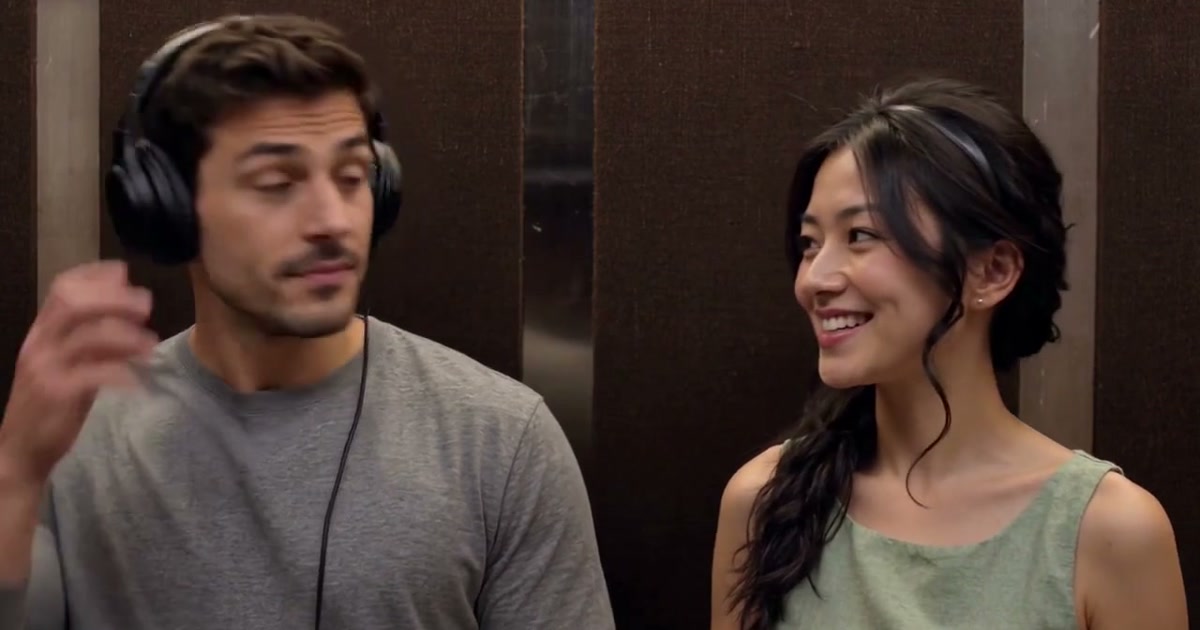
What is the Elevator Scene AI video?
The scene turns a quiet elevator ride into a small moment of connection. One passenger is absorbed in music; another enters and starts a conversation. The listener's posture, the speaker's arrival, and the final reaction make it recognizable. Replacing the faces gives friends or couples a familiar movie moment to share.
Watch the complete reference before picking your photos. Pay attention to which person is already listening to music and which person begins the conversation. These roles have different actions, so choose the casting that makes sense for your version. The template follows this short scene in a 16:9 landscape frame.
Choose portraits for the listener and speaker
The Listener portrait is required. It belongs to the passenger wearing headphones and listening to music. Add your own photo here if that is the role you want to play. The Speaker portrait is optional and belongs to the person who enters and begins the conversation. Leaving it empty keeps that performer from the reference.
Upload a separate portrait for each role you want to replace. Choose one person per image, with the full face clearly visible. Before submitting, look at both labels and thumbnails together: it is easy to pick two good photos but assign them the wrong way around. If you only want to replace one person, fill the listener slot.
Prepare photos for the elevator AI generator
Use a sharp, evenly lit adult portrait that includes the head and shoulders. A face turned slightly toward the camera is easier to inspect than an extreme side view. Check that the eyes, nose, and mouth are visible. Photos with strong filters, motion blur, sunglasses, or deep shadows make it harder to recognize the person during movement.
Accepted files are JPG, PNG, and WebP, up to 10 MB each. If your image is larger, save a smaller copy while keeping the face clear. For two portraits, aim for similar clarity and lighting. Use images you have permission to upload and get agreement from every adult whose face you use.
Generate your 15-second Elevator Scene AI video
Sign in and check the portraits before submitting. This elevator template creates a 15-second, 16:9 landscape video for 15 credits. New accounts start with zero credits. Buy a credit pack through Pricing, then return to the generator and confirm that your balance covers the cost shown in the form.
Once submitted, the task appears in My videos. Queued means it is waiting to start; rendering means the video is being generated. Open the completed task to play your result. If generation fails, that task's credits are refunded. Check the existing task's status before submitting again, especially if the result has not appeared yet.
Check the conversation and final reaction
Play the full video at normal speed first. Follow the listener's attention as the speaker arrives, then watch the final reaction. Both faces should stay recognizable as heads move. Replay the entrance and conversation to check that your chosen people remain in their intended roles and that the framing keeps the interaction visible.
Listen to the completed clip before downloading. Check the actual audio that came with your result; choose licensed music if you later add or replace a track in an editor. For a social post, also preview any vertical crop you make, since a tight frame can lose one person's reaction. Label the shared video as AI-generated.
Improve your next elevator video
If one face becomes unclear during the scene, replace that portrait with a sharper image in even light. If the roles appear swapped, check the Listener and Speaker slots. Keep the other photo when it is already working so you can compare the changed person's result more easily. Each new submission uses another 15 credits.
Review the moment that matters to you before deciding to try again. For a couple's remix, that may be the listener's final expression; for a joke between friends, it may be the speaker's entrance. Compare that moment with the reference and check the face, body position, and framing together rather than judging from a single thumbnail.
15-second model prompts
This elevator moment from (500) Days of Summer pairs an absorbed listener with an unexpected conversation. Choose a model-specific 15-second shot plan; the built-in template also renders up to 15 seconds.
Create a 15-second, 16:9 cinematic elevator scene inspired by the awkward-romantic elevator moment in (500) Days of Summer. Keep the same two young adults, wardrobe, elevator and medium two-shot throughout. 0-4s: the man rides alone, absorbed in music through over-ear headphones, eyes forward. 4-7s: the woman steps in, smiles and starts a conversation. 7-10s: he lowers the headphones to his neck and turns toward her with mild surprise. 10-13s: she repeats herself with a brighter smile; he holds eye contact, shy and unsure. 13-15s: a brief quiet pause, a small side glance from her, then hold the two-shot. Natural restrained acting, steady camera, realistic elevator light, consistent faces and hands. No extra people, cuts, captions or logos.
Questions, answered
Do I need two photos?
One listener portrait is enough. Add a separate speaker portrait if you want to personalize both roles; otherwise the speaker stays from the reference scene.
Which role wears headphones?
The listener is the headphone-wearing passenger. The speaker is the person who enters and starts the conversation. Use the labeled photo slots to choose who plays each part.
How long is the video, and what does it cost?
This template generates a 15-second landscape video in 16:9 for 15 credits. You need a signed-in account and sufficient credits to submit a task.
Can I use a photo of two people together?
Prepare separate single-person portraits for this generator. Upload one in the listener slot and, if you are changing both people, another in the speaker slot.
Where can I download the video?
Open My videos after the task completes, play the result, and download it there. Check the interaction, faces, framing, and sound before sharing.
What happens to my credits if it fails?
Credits spent on a failed generation are refunded. Check the task status in My videos before starting a replacement task.
How are my photos handled?
MemeRadar's Privacy Policy explains how uploaded photos and generated videos are handled, including storage and deletion information.