Viggle Remake: Video Recasting and Scene Edits
Last updated:
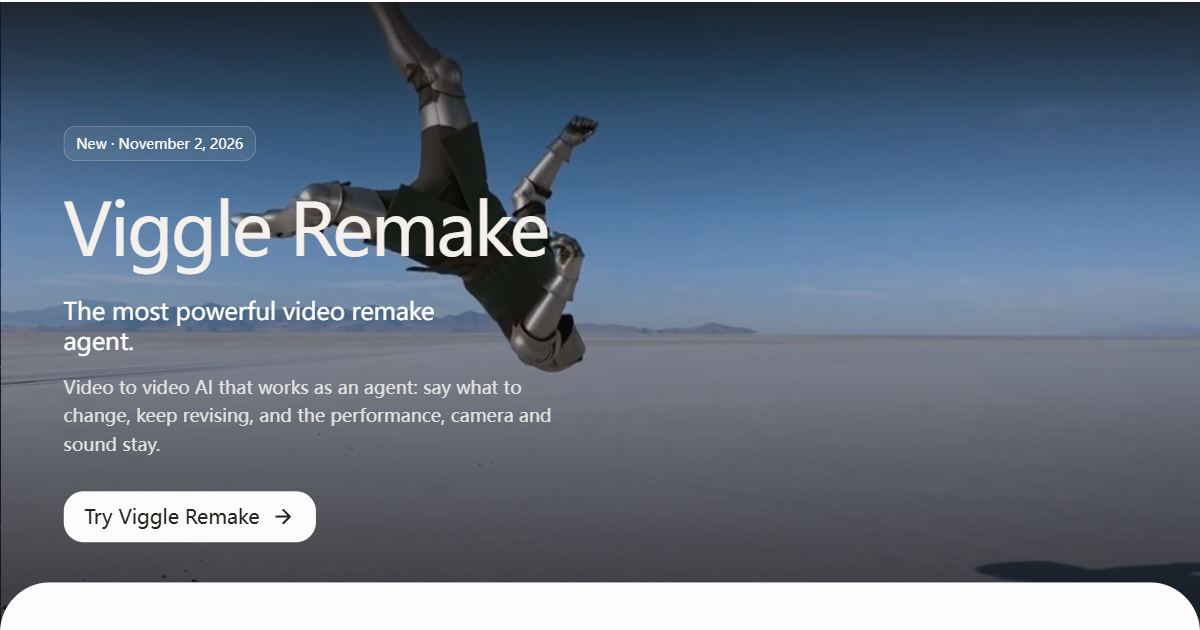
Viggle Remake changes who or what appears in a video while keeping a recognizable performance underneath. A ballroom couple can become flamingos, an action scene can acquire a cast of pets, and the same dancer can appear in a different outfit or setting. The surprise comes from a familiar movement played by an unexpected character. Explore the official examples to see how the idea works, which details change and what to look for when comparing a source clip with its remake.
What is Viggle Remake?
Viggle Remake is Viggle AI’s video-to-video editing system. It uses existing footage as the basis for changing characters, clothes, objects or surroundings. The original performance provides the timing and movement, so a gesture or turn can remain recognizable after the scene looks very different. [2]
Its two main modes serve different edits. Swap focuses on replacing people or characters, including multiple subjects in a scene. Edit changes objects, scenery, weather or lighting. Start by deciding whether your idea changes the cast or the setting, then compare the corresponding official demonstration to see the kind of transformation involved. [2]
Why a familiar performance works with a surprising cast
Familiar movement gives the remixes an immediate payoff. You already know what a dance step, dramatic entrance or film fight looks like. When an animal or toy takes the performer’s place, the action gains a different personality. A serious move can become funny without a new explanation or setup.
A source-and-result comparison makes that change easy to follow. Watch a ballroom couple become flamingos, or a performer take on a metallic appearance. The shared gesture gives your eye something to track while the character, material or setting changes around it. The interesting moment is where a familiar action still reads through a surprising appearance. [1]
The idea also invites variations. One viewer may want a pet in an action scene; another may prefer a new costume or a different season in the background. Because the performance gives the versions a common structure, it is easy to compare which change makes the strongest visual joke.
From a motion remake to a scene remake
A character replacement changes the person performing an action. A wider scene edit can change what surrounds that person as well. Viggle Remake brings those possibilities into the same video-editing product: you can explore a new cast, a changed prop or another visual treatment of the location.
For a meme, changing one recognizable element can be enough. A cat playing a serious fighter creates a different joke from a realistic actor wearing another jacket. Weather or scenery changes can alter the mood while leaving the performer recognizable. Choose a change that the viewer can notice quickly rather than filling the frame with unrelated transformations.
Viggle’s official product page provides examples to watch, and its public model page contains additional demonstrations and usage information. Access, pricing and licensing can differ between the hosted app and downloadable files. Check the option you intend to use before starting a project.
Three Viggle Remake examples to watch
A dance with a different cast
The La La Land example keeps the dance recognizable across different characters, costumes and visual treatments. Follow one gesture or turn from the source into a remake. The common movement makes it easier to notice what each new appearance adds, from a surprising silhouette to a change in mood. [2]
An action scene played by pets
The Matrix Reloaded example gives the fight a tuxedo-cat and shiba-inu cast. Serious choreography meets animals with familiar expressions and body shapes, creating the contrast. Watch fast turns and overlaps to see whether the characters remain distinct as the action moves. [2]
A parody across several shots
The White House Funk demonstration applies a recurring synthetic cast to a music-video parody. A new character has to remain recognizable after each cut, not just in one attractive frame. Compare faces and outfits between shots to see how well the repeated identity carries through the sequence. [2]
How to compare a source clip with its remake
Start with the same moment in both videos. Watch where a face turns, a hand crosses the body or an object enters the frame. The movement gives you a useful anchor for comparing the transformation. A convincing still image is only one part of a video: the character also needs to remain readable as the action continues.
Next, look at what you intended to change. For a new cast, follow each person through turns and overlaps. For a scene edit, check the edges of a prop, reflections, weather and lighting. A recognizable relationship between the action and the changed element helps the remake feel like a coherent version of the source.
For a longer clip, watch across cuts as well as within a shot. Clothes, hair and recurring props should be easy to follow when the camera changes. A short caption can explain the joke, but the main visual change should be understandable before the viewer has to read it.
What to check before trying the examples
To try Viggle Remake itself, use Viggle’s current access options and check the price shown there. MemeRadar explains this tool and its examples; its own generator catalog contains separate meme templates. Choosing a MemeRadar template does not run the external Viggle product.
Choose footage you can edit and get agreement from people whose likenesses you use. In the finished result, inspect hands near faces, small text and transparent or reflective objects. These details can change as the scene moves. Replay the entire export before deciding whether a particular remake is ready to share.
When sharing a fictional performance, identify it as AI-generated and credit the footage or sound you reuse. A model license, a subscription and permission for the original media are different things to check. Keep the permissions for the actual materials in your project with the finished file.
Google Trends for Viggle Remake
The chart shows searches for “viggle remake” in the selected place and period. Google Trends scales the phrase’s interest from 0 to 100 within that selection. Check the location, dates and update time before comparing a rise with an announcement or a widely shared demonstration.
A small query can produce a sparse or broken-looking curve. Zero can mean that activity is too low to report. The curve adds search context, while the source-and-result videos show the actual edits people can watch. Use both to distinguish interest in a product name from your own judgment of a particular example.
Questions about Viggle Remake
What makes this useful for meme videos?
A familiar performance gives viewers something to recognize immediately. Recasting the subject can turn the same movement into a different character joke, while a recurring scene makes multiple versions easy to compare.
Where can I find representative examples?
The official product page provides source-and-remake comparisons. The Hugging Face model card adds longer film and music-video examples, along with links to the model documentation and source credits.
Can it change the background as well as the person?
The official edit mode covers objects, settings, weather and lighting. The swap mode focuses on people and characters. The examples show both kinds of transformation, giving readers a way to distinguish the intended editing tasks.
Google Trends
Loading trend data…