Chipmunks Dance AI: The Trio Trend Explained
Last updated:
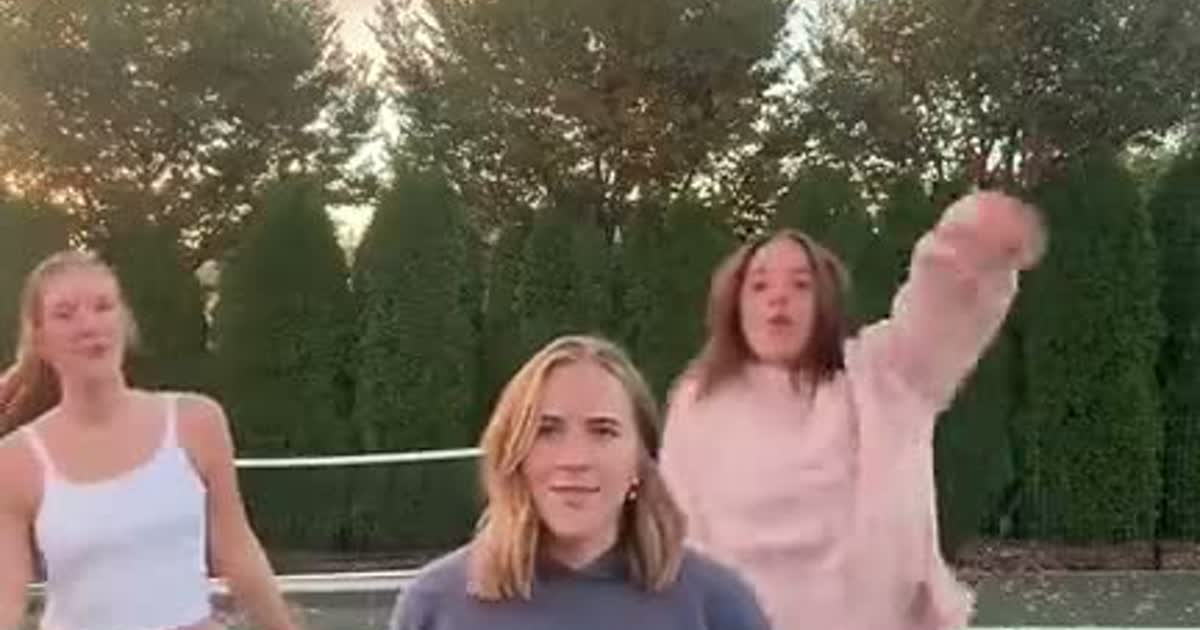
Chipmunks Dance AI turns a three-person dance into a joke starring you and your friends. Three dancers line up, spin, trade the front spot and move toward the camera. The familiar routine makes a new cast easy to recognize: a shy friend can become the lead, or one person can join the existing trio. Watch the court reference to follow the moves, then choose a 5-, 12- or 15-second photo remix on MemeRadar.
What is the Chipmunks Dance AI trend?
The Chipmunks Dance AI trend pairs a three-person routine with a high-pitched version of You Spin Me Round. The dancers begin in a row, circle their fingers, turn and take turns leading. Each move gives the next performer a chance to catch the viewer’s eye. A serious expression, a hair flip or a sudden approach to the phone can make the same choreography feel different with each cast. [1] [3]
The version on this page features people dancing on an outdoor court. Other videos use animated chipmunks or animal characters. The court routine is easy to recognize from the three human performers, the fixed camera and the changing formation. Watch a reference before picking a template so you get the scene you had in mind.
The costume dance and the outdoor-court version
Two recognizable versions connect the dance to the Chipmunks name. In the costume performance, the trio wears chipmunk outfits. In the court version, three dancers in everyday clothes perform the turns and swaps on a green outdoor court. Both make the changing lead part of the joke: the person at the front gets a moment of attention before another dancer takes over. [1] [2]
MemeRadar uses the outdoor-court routine as its reference. A basketball hoop hangs above the frame and a hedge runs behind the dancers. The person in the middle begins closer to the phone, while the people on either side have room to turn and move forward. The complete reference lasts fifteen seconds; the generator offers three shorter-or-full-length choices so you can choose how much of the routine to remake. [1]
Why the spins and position swaps make it easy to remix
A three-person lineup gives viewers a clear starting point. Once they know who begins on the left, in the middle and on the right, a change of leader becomes easy to follow. Finger circles and turns repeat across the group, while hair flips, facial expressions and close approaches give each dancer a distinct moment. The format balances a shared sequence with room for personality.
Changing the cast supplies another layer of humor. Friends can recognize themselves in an exaggerated group performance, or assign the front spot to the person who usually avoids dancing. One replacement creates a cameo among the reference dancers; three replacements make the whole group the subject.
The fixed court background also helps the joke read quickly. The net, hedge and sky stay recognizable while the people move. A viewer does not need a long setup to understand what changed between the reference and a remake. Short vertical framing suits sharing as a reaction, group-chat surprise or birthday clip.
How Chipmunks Dance AI maps your photos to dancers
MemeRadar labels the cast by the opening frame, as you see it: left, middle and right. Tap a face marker to add one photo for that person. You can replace any combination of one, two or three people. An empty position keeps the reference identity in the prepared cast.
Choose a clear photo with one adult per image. A standing portrait helps show the clothes and overall appearance you want carried into the dance. Keep the face visible, use even light and leave space around the body. A group photo makes the intended subject harder to distinguish. The picker shows your chosen image at its position so you can catch a left-right mix-up before submitting.
Choose the moment you want to remake
Choose five seconds for a quick introduction to the cast, twelve seconds for more of the shared routine, or fifteen seconds for the complete reference sequence. Each option costs one credit per second. The number of photos does not change the price: replacing one dancer and replacing all three cost the same at a given length. Portrait 9:16 and landscape 16:9 are available.
After generation, follow each person through the turns and overlaps. Left, middle and right identify the opening positions; dancers can move across the frame during the performance. Check that the face, hairstyle and outfit stay with the intended person, especially when someone steps toward the camera. Play the downloaded file once before sharing to see how the final movement and any caption fit together.
Google Trends for Chipmunks Dance AI
Google Trends shows how interest in “chipmunks dance ai” changes in the place and period selected on the chart. The scale runs from 0 to 100, with 100 marking that term’s peak within the selection. A zero can reflect too little activity to report. If no curve is shown, open Google Trends from the chart area to explore another date range or location.
Keep the actual video in view when exploring the phrase. Human trio routines and animated animal clips can share the same search wording, so a rising curve alone does not identify the dance you want. The three-person formation, court setting and change of leader are the quickest visual clues for the version featured here.
Frequently asked questions
Will the generator turn me into a cartoon chipmunk?
This template follows the human court dance. Your selected photos provide the replacement cast, and the reference provides the movement.
Do I need three photos?
You can replace one, two or all three dancers. Add one photo per selected position and leave the others empty to keep their reference identities.
How long is the MemeRadar version?
Choose 5, 12 or 15 seconds for 5, 12 or 15 credits, in portrait 9:16 or landscape 16:9. The price is the same regardless of how many positions you fill. A failed generation returns its credits.
Can I share the result with the song?
Check the downloaded audio and the sharing platform’s music rules. Use a licensed sound when adding music, get permission for the photos you upload and identify the result as AI-generated.
Google Trends
Loading trend data…