End of Watch AI Video: The Locker-Room Scene
Last updated:
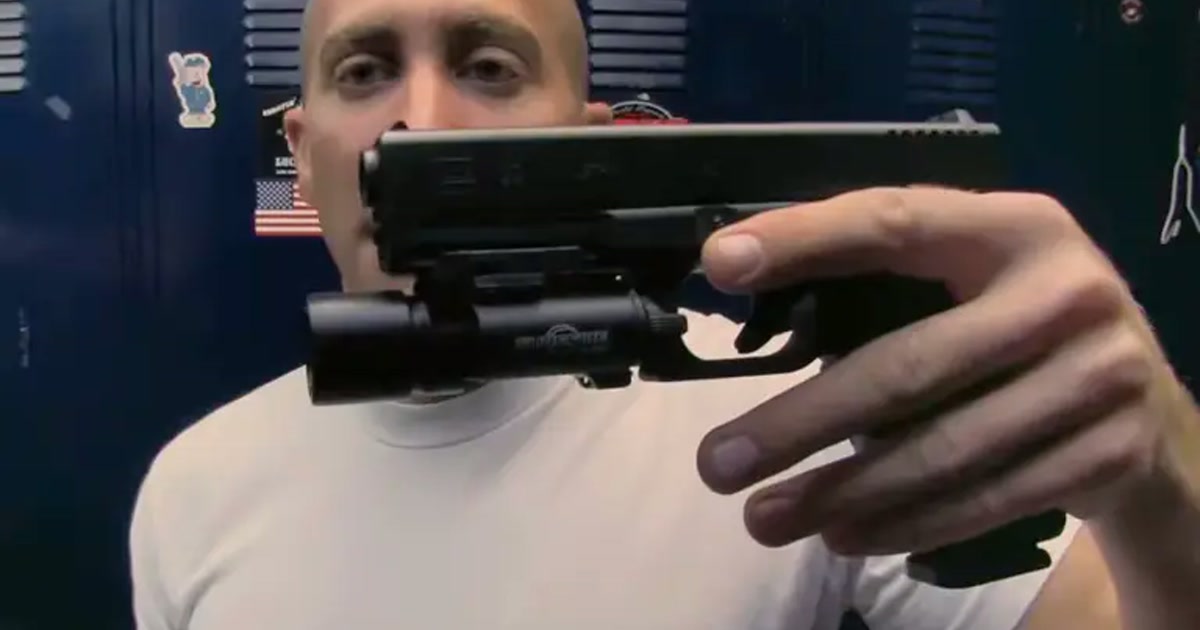
The End of Watch AI video turns the film’s locker-room gear check into a personal performance. A character faces the camera, draws attention to equipment and exchanges a moment with a partner. Remakes put familiar faces into that serious setup, so a friend can suddenly look like the lead in a police movie. Watch the reference for the gestures and the partner’s position: the joke depends on how the person presents themselves as much as on the costume.
Where does the End of Watch AI video come from?
The reference comes from the locker-room scene associated with End of Watch, the 2012 police film starring Jake Gyllenhaal. Its camera-facing presentation makes a gear check feel like a performance for the viewer. The person in front shows off the equipment while a partner gives the moment its two-person setting. [1]
The meme borrows that presentation. A workplace version can replace the police gear with familiar tools; a photo remix can keep the movie setup and replace the people. Both use the same contrast: a serious introduction to someone’s kit becomes funny when the subject or equipment is unexpectedly ordinary.
What to watch in the locker-room scene
Follow the lead’s hands and face together. Showing an object to the lens draws attention to it, while a pause or look toward the camera turns the display into a small performance. The scene has a rhythm of presenting, moving on and acknowledging the person watching. Recognizing that rhythm helps you spot the format even when a remake uses different faces.
Watch the second person too. A partner can stay behind the lead or share the edge of the frame, giving the foreground character someone to turn toward. The position matters when choosing a two-person remix: replacing only the lead makes one person the star, while replacing both makes the scene a shared joke between friends.
Why the End of Watch AI video suits a photo remix
The scene gives the new face an immediately recognizable role. Viewers see a locker room, a serious outfit and deliberate attention to equipment. When the face belongs to someone they know, the contrast arrives without a long explanation. A quiet friend playing the self-assured lead can be enough to make the clip worth sending.
The partner creates another choice for the joke. Two friends can cast themselves as a team, or put the person who usually stays in the background into the lead role. Think about who should get the camera-facing moment before picking the photos. The opening labels identify roles, not simply two interchangeable faces.
Which excerpt does MemeRadar use?
The MemeRadar template uses a seven-second excerpt, with a gear check, a turn toward the partner and a camera-facing finish. Other online versions can be longer or use different edits. Compare the reference on the generator page with the video you remember before choosing it; the same film name does not mean every template includes the same actions.
Landscape 16:9 is the default composition for this template. It leaves room for both people and their surroundings. If you later crop the result for a vertical post, check that the partner and the lead’s hands remain visible. Cutting away a person or an important gesture can change the scene more than replacing a face does.
Cast yourself and a partner
The generator needs one Lead portrait. You can add a separate Partner portrait, or leave that role unchanged. There is also a shared-photo option: put the lead on the left and the partner on the right, then adjust the split between them. Check the two face previews before submitting so each person gets the role you intended.
Use clear adult photos with permission from the people pictured. JPG, PNG and WebP are accepted, up to 10 MB each. The seven-second task costs seven credits. Sign in and buy a credit pack before generating; new accounts start with zero credits. The form shows your selected task’s cost before submission.
Check the finished scene
Open My videos to follow the task and download the completed MP4. Watch the face through the turn, the hands near the equipment and the partner’s appearance. Check that the closing moment is intact. The reference guides the performance, while your photos supply the replacement people; the finished movement and details can vary.
A new submission spends another seven credits, so review the existing result before deciding to try again. Failed generation tasks return their credits. Listen to the output, leave room for the faces when adding captions and label the shared clip as AI-generated. If you want a quieter two-person exchange, the elevator movie scene offers a different kind of performance.
Frequently asked questions
Which film is the locker-room scene from?
It comes from End of Watch, the 2012 police film starring Jake Gyllenhaal. The camera-facing gear display provides the setup for the remix.
How many people can I replace?
Replace the lead alone or add the optional partner. The generator also accepts one shared photo, with the lead on the left and partner on the right.
Google Trends
Loading trend data…